Introduction: The Modern MacBook Charging Dilemma
The bigger takeaway is simple: Modern Apple MacBooks offer users a convenient choice when it comes to powering up: the classic, magnetic MagSafe connector or the versatile, industry-standard USB-C port. While both methods efficiently charge your device, they each come with unique advantages and considerations. Understanding these differences can help you decide which option best suits your workflow and priorities.
Table of Contents
- Introduction: The Modern MacBook Charging Dilemma
- Unpacking MagSafe: The Magnetic Advantage
- USB-C: The Universal Powerhouse
- Performance and Speed: Is One Faster?
- Making Your Choice: Which Charger is Right For You?
- Conclusion: A Matter of Preference
- Expert Perspective
- Frequently Asked Questions
- Safety First with MagSafe
- Dedicated and Distinctive
- MagSafe’s Limitations
- Unrivaled Versatility
- Widespread Compatibility
- The USB-C Trade-offs
- Why does MacBook Charging matter right now?
- What broader change could MacBook Charging signal?
- What should the market watch next around MacBook Charging?
Unpacking MagSafe: The Magnetic Advantage
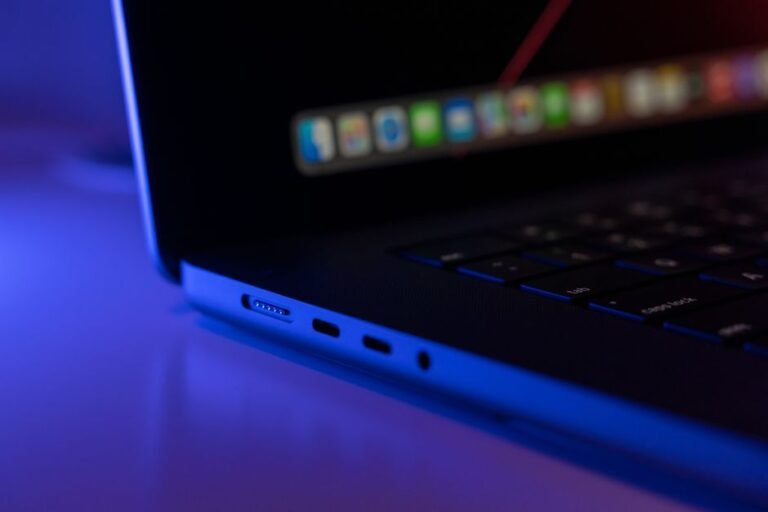
Meanwhile, MagSafe, a beloved feature reintroduced in newer MacBooks, is renowned for its distinctive magnetic connection. This design offers a blend of safety and convenience that many users appreciate.
Safety First with MagSafe
The primary benefit of MagSafe is its magnetic breakaway design. If someone trips over your charging cable, the magnetic connector simply detaches from your MacBook, preventing your expensive laptop from being yanked off a desk or table. This safety feature can save you from costly repairs or replacements.
Dedicated and Distinctive
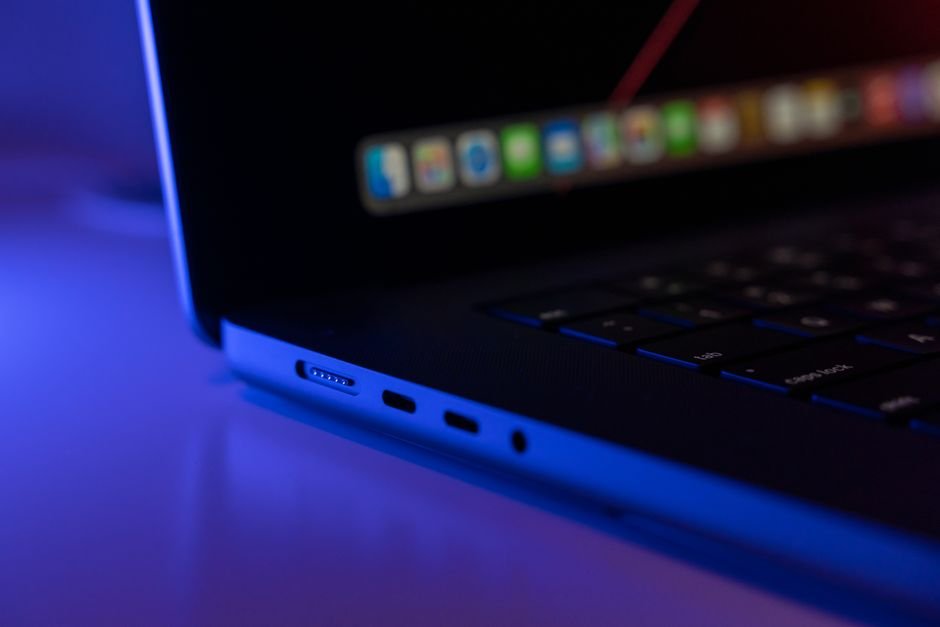
In practical terms, MagSafe offers a satisfying, secure connection with a clear visual indicator that your MacBook is charging. It’s a dedicated power port, meaning it doesn’t occupy a valuable USB-C port that could be used for other peripherals or data transfer.
MagSafe’s Limitations
While excellent for safety, MagSafe is a proprietary Apple technology. This means you can’t use a MagSafe charger for other devices, and different generations of MagSafe (like MagSafe 3 on newer models) are not cross-compatible with older MagSafe 2 or MagSafe 1 chargers.
USB-C: The Universal Powerhouse
For example, USB-C has become the ubiquitous port for modern electronics, and MacBooks are no exception. Its versatility goes far beyond just charging.
Unrivaled Versatility
One of USB-C’s biggest strengths is its multi-functionality. A single USB-C port can not only charge your MacBook but also transfer data at high speeds, connect to external displays, and even power other accessories. This means you can consolidate your cable collection.
Widespread Compatibility
That said, Since USB-C is an industry standard, you can use many third-party USB-C chargers and cables to power your MacBook. This offers greater flexibility, especially when traveling, as you might be able to use the same charger for your MacBook, smartphone, and other gadgets.
The USB-C Trade-offs
The main drawback of USB-C charging for MacBooks is the lack of a magnetic breakaway. If the cable is snagged, it could potentially pull your laptop down. Additionally, using a USB-C port for charging means one less port available for other peripherals like external drives or monitors, which can be a consideration on models with fewer ports.
Performance and Speed: Is One Faster?
Interestingly, When it comes to charging speed, both MagSafe and USB-C are capable of delivering fast charging to your MacBook. The speed largely depends on the wattage of the power adapter you’re using, rather than the port type itself. Modern MacBooks often ship with high-wattage USB-C power adapters, and MagSafe 3 supports equally rapid charging speeds.
Making Your Choice: Which Charger is Right For You?
Deciding between MagSafe and USB-C ultimately comes down to your personal priorities and usage patterns:
- For Maximum Safety: If you frequently work in busy environments or have pets and children around, MagSafe’s magnetic breakaway offers invaluable peace of mind against accidental pulls.
- For Ultimate Versatility: If you value having fewer cables and a single port that can handle charging, data, and video, USB-C’s universal appeal is a clear winner. It’s also great for travel, as one charger might suffice for multiple devices.
- For Port Efficiency: If your MacBook has limited ports and you need them for other accessories, using the dedicated MagSafe port for charging keeps your USB-C ports free.
Conclusion: A Matter of Preference
However, Both MagSafe and USB-C are excellent, reliable ways to charge your MacBook. Apple has provided users with the flexibility to choose the method that best aligns with their lifestyle. Whether you prioritize the safety of a magnetic connection or the universal adaptability of USB-C, your MacBook is designed to keep you powered up efficiently.
Expert Perspective
From an industry angle, the clearest signal around MacBook Charging is how it may influence magsafe. The story reads less like a one-day spike and more like a marker of broader movement.
The next phase will depend on how quickly teams, regulators, or customers react. In practice, that gives MacBook Charging room to reshape expectations across charging over the near term.
For readers focused on practical impact, the best next step is to watch what changes around port once attention turns into execution.
Frequently Asked Questions
Why does MacBook Charging matter right now?
Introduction: The Modern MacBook Charging DilemmaThe bigger takeaway is simple: Modern Apple MacBooks offer users a convenient choice when it comes to powering up: the classic, magnetic MagSafe connector or the versatile, industry-standard USB-C port.
What broader change could MacBook Charging signal?
While both methods efficiently charge your device, they each come with unique advantages and considerations.
What should the market watch next around MacBook Charging?
Understanding these differences can help you decide which option best suits your workflow and priorities.Unpacking MagSafe: The Magnetic AdvantageMeanwhile, MagSafe, a beloved feature reintroduced in newer MacBooks, is renowned for its distinctive magnetic connection.
Source: https://www.engadget.com/2252867/usb-c-vs-magsafe-best-macbook-charging-option/